Feed on
Posts
Comments

I have several Raspberry Pi 3 and 4 out in the field running Raspbian/Raspberry Pi OS/Debian 9/12/13, and like everything else have Chef running on them. These are 32-bit armv7l and 64-bit aarch64 platforms and installers normally aren’t built for them, so you gotta do it yourself. I’m not a fan of just spewing files or gems onto a filesystem, I want my stuff in proper Debian packages. mattray’s build instructions and parts of the DEB-chef-cinc.sh script have got me through the switchover to building Debian packages for Cinc 15/16/17 on my own, but I started having problems on Cinc 18.

I have practically no expertise with Ruby bundler and Omnibus so I’ve just been using whatever big hammer that works for now, so there are surely proper ways to fix my problems I haven’t spent time on yet. I do Cinc builds for these maybe twice a year, so for me it’s not worth the effort to make it perfect. These are my notes for what I’ve been doing that may help others and in case I lose my Raspberry Pi used for builds. Apologies for the clowntown.

omnibus-toolchain and libatomic.so.1

Omnibus-toolchain is an intermediate step to get working omnibus tools to start building the real Chef/Cinc installer. It’s installed as a Debian package to /opt/omnibus-toolchain/. This doesn’t have to be built every single time a new minor release of Chef comes out, but needs to be periodically rebuilt. Which is a good thing because on a RPi 3 this takes several hours to build as it builds ruby, openssl, and a ton of everything else. Building Chef isn’t nearly as bad but still takes a couple of hours.

In particular on Raspberry Pi 3 (armv7l) I had a problem with omnibus-toolchain and binaries being linked against libatomic.so.1 but that library not being bundled in:

           [HealthCheck] E | 2025-08-30T17:48:15-05:00 | The following libraries have unsafe or unmet dependencies:
    --> /opt/omnibus-toolchain/embedded/libexec/git-core/git-remote-http
    --> /opt/omnibus-toolchain/embedded/libexec/git-core/git-http-fetch
    --> /opt/omnibus-toolchain/embedded/libexec/git-core/git-http-push
    --> /opt/omnibus-toolchain/embedded/libexec/git-core/git-imap-send
    --> /opt/omnibus-toolchain/embedded/lib/ruby/3.1.0/armv7l-linux-eabihf/openssl.so
    --> /opt/omnibus-toolchain/embedded/lib/libcrypto.so.3
    --> /opt/omnibus-toolchain/embedded/lib/engines-3/padlock.so
    --> /opt/omnibus-toolchain/embedded/lib/engines-3/afalg.so
    --> /opt/omnibus-toolchain/embedded/lib/engines-3/capi.so
    --> /opt/omnibus-toolchain/embedded/lib/engines-3/loader_attic.so
    --> /opt/omnibus-toolchain/embedded/lib/libcurl.so.4.8.0
    --> /opt/omnibus-toolchain/embedded/lib/ossl-modules/legacy.so
    --> /opt/omnibus-toolchain/embedded/lib/libssl.so.3

            [HealthCheck] E | 2025-08-30T17:48:15-05:00 | The following binaries have unsafe or unmet dependencies:
    --> /opt/omnibus-toolchain/embedded/bin/openssl
    --> /opt/omnibus-toolchain/embedded/bin/curl

            [HealthCheck] E | 2025-08-30T17:48:15-05:00 | The following libraries cannot be guaranteed to be on target systems:
    --> /usr/lib/arm-linux-gnueabihf/libatomic.so.1 (0x766e8000)
    --> /usr/lib/arm-linux-gnueabihf/libatomic.so.1 (0x767fc000)

Apparently this is only a Raspberry Pi 3 problem as this library is addressing some shortcomings in the arm7 architecture.

After beating on Claude for a while what I wound up doing was creating a config file for libatomic within the git checkout of omnibus-software (omnibus-toolchain/config/software/libatomic.rb):

name "libatomic"
default_version "1.0"

license :project_license

build do
  command "mkdir -p #{install_dir}/embedded/lib"
  command "cp -L /usr/lib/arm-linux-gnueabihf/libatomic.so.1* #{install_dir}/embedded/lib/ || true"
  command "cp -L /usr/lib/aarch64-linux-gnu/libatomic.so.1* #{install_dir}/embedded/lib/ || true"
end

and adding a dependency line to omnibus-toolchain/config/projects/omnibus-toolchain.rb:

...
dependency "omnibus-toolchain"
dependency "ruby-cleanup"

# XXX: local fix
dependency "libatomic"

exclude '\.git*'
exclude 'bundler\/git'
...

After nuking the caches under /var/cache/omnibus, starting another build, this finally got me a working omnibus-toolchain_3.0.41~20260117203037-1_armhf.deb package.

git 2.11 on Raspbian 9 (Stretch) is too old

The copy of Raspbian 9 I had on my Raspberry Pi 3s included git 2.11. Apparently it did not like doing a --depth 1 fetch and silently errored out.

Fetching https://github.com/chef/omnibus-software.git
Git error: command git fetch --force --quiet /home/omnibus/omnibus-....

[omnibus@canary01 omnibus-software-2799d14cecc5]$ git fetch --force /home/omnibus/omnibus-toolchain/.bundle/ruby/3.1.0/cache/bundler/git/omnibus-software-338444b7bc50110d52bb35857ad8f946482db0ef --depth 1 2799d14cecc59c6a351c5cba3761c01fff9a65a7
[omnibus@canary01 omnibus-software-2799d14cecc5]$ echo $?
1
[omnibus@canary01 omnibus-software-2799d14cecc5]$ ls -l
total 0
[omnibus@canary01 omnibus-software-2799d14cecc5]$

After building git 2.44 and installing it to /usr/local/bin/git, this fixed the problem. This also required installing libcurl4-openssl-dev, libcurl4-gnutls-dev, libexpat1-dev, gettext, and zlib1g-dev in order to have the git build to also make the required git-remote-https too.

license_scout can not detect licensing information

I was hitting this on both my 32-bit and 64-bit builds of Cinc 18, this seems like a new thing. Best I can remember this was trying to fetch a hardcoded URL for a license file on github which no longer existed and would require patching to fix?

          [Builder: chef] I | 2023-10-26T07:46:42-05:00 | Finished build
              [Licensing] W | 2023-10-26T07:46:47-05:00 | Can not automatically detect licensing information for 'chef' using license_scout. Error is: 'Network error
 while fetching 'https://raw.githubusercontent.com/socketry/multipart-post/main/README.md'
404 Not Found'

Encountered error(s) with project's licensing information.
Failing the build because :fatal_licensing_warnings is set in the configuration.
Error(s):

    Can not automatically detect licensing information for 'chef' using license_scout. Error is: 'Network error while fetching 'https://raw.githubusercontent.com/soc
ketry/multipart-post/main/README.md'
404 Not Found'

by now I was pretty frustrated and just wanted the damn thing to build. So I did this in the DEB-cinc-sh instructions:

bundle exec omnibus build cinc -l internal \
  --override fatal_licensing_warnings:false \
  --override fatal_transitive_dependency_licensing_warnings:false

I have no idea what this does, it probably means my packages are missing license files or something and shouldn’t be distributed.

cinc vs cinc-full source tarballs

In the Cinc source code repository, there are two types of source tarballs. One is named cinc-full-X.XX.XX.tar.xz and the other is cinc-X.XX.XX.tar.gz. The full- tarballs contain an additional omnibus-software directory and seem to only be for new minor version releases and not every point release (e.g. 18.1.0 vs 18.8.54). I really don’t know what the difference is and haven’t got around to asking. I’ve been successful building the cinc-full versions, such as 18.1.0, but was having problems with newer point releases. On 18.8.54 I tried copying the cinc-full-18.1.0/omnibus-software directory over and made the two directory trees look similar and if I remember right, my problems went away. So I’m guessing this is the omnibus build config for this particular minor tree and it’s good enough to build successive releases.

Other tips and notes

  • You don’t have to build ruby every single time you run the DEB-cinc-sh script, I have it commented out and only do it when neccessary. For building Cinc 17 I needed to bump up from ruby 2.7.4 to 2.7.8, and then for Cinc 18 I needed to build again to get to Ruby 3.1.4 which would provide the required bundler 2.x.


  • If you skip build steps such as Ruby, make sure you still source things like rbenv init - and add $HOME/.rbenv/bin: to your path. This makes sure you’re getting things like the new version of Ruby and bundler, not what’s on your system. If you’re skipping building omnibus-toolchain then make sure /opt/omnibus-toolchain/bin is in your PATH too, it also has its own version of bundle, ruby, and gem there.

e.g.

root@canary01:/home/omnibus# ./.rbenv/versions/3.1.4/bin/ruby --version
ruby 3.1.4p223 (2023-03-30 revision 957bb7cb81) [armv7l-linux-eabihf]
root@canary01:/home/omnibus# ./.rbenv/versions/3.1.4/bin/bundle --version
Bundler version 1.16.0

root@canary01:/home/omnibus# /opt/omnibus-toolchain/embedded/bin/ruby --version
ruby 3.1.6p260 (2024-05-29 revision a777087be6) [armv7l-linux-eabihf]
root@canary01:/home/omnibus# /opt/omnibus-toolchain/embedded/bin/bundle --version
Bundler version 2.3.27

[omnibus@canary01 omnibus]$ echo $PATH
/opt/omnibus-toolchain/bin:/home/omnibus/.rbenv/shims:/home/omnibus/.rbenv/bin:/usr/local/sbin:/usr/local/bin:/usr/sbin:/usr/bin:/sbin:/bin:/usr/local/games:/usr/games
  • When building all this your real Cinc files in /opt/cinc get used, trashed, and overwritten, so you really do need to have a working Cinc in place first and chown it to omnibus:omnibus so the build processes can use it as a build directory (surely this can be avoided). After you’re done building your new package you can install it on your system and it makes it all work again.
  • When building Cinc 18.8.54 I hit an error saying the version of Ruby I had (it was sourcing /opt/cinc/embedded/ruby) wasn’t new enough for some ssl thing, so I had to build Cinc 18.1.0 first, install it, and then I could use it to build 18.8.54.
  • Another occasional issue I had was during omnibus build of chef, it would complain like /opt/cinc/bin/chef-apply existed and it couldn’t handle this (despite having full ownership of the directory). When this would happen I’d just rm /opt/cinc/bin/*, re-run build and that let it go on its merry way.

TL;DR: re-re-patching vintage Turbo Pascal programs so they work in modern times on modern hardware

Wildcat! v4, a MS-DOS based bulletin board system was written in the 1990s in Borland Turbo Pascal and was not completely Y2k compatible. Internally the Wildcat! database understands the four-digit year just fine. (Wildcat! was not the only BBS software with Y2K issues.) The problem specifically is when dropping to an external program such as a door and returning, it reads/writes a session state file called SYSINFO.DAT which contains two-digit years. So when Wildcat! loads back in it sees the caller has been on since, say, 1/21/15, it thinks they’ve been on since 1915, a hundred years beyond their allowed time limit and punts them off. It also affects bulletin read state somehow, prompting you that almost all bulletins have been updated since your last call.

Fortunately there’s fixes for this to make Wildcat! work in the modern age by permanently manipulating the internal epoch year so that everything earlier than say year x/x/26 is really treated as 2026 and not 1926. One such program is called PatchWC! by Joe Martin of Via Software, commonly distributed as PWC300.ZIP. (See note below about why this doesn’t work in DOSBOX-X)

Another patch for Wildcat! that is almost always needed is to get around the Borland Turbo Pascal “Runtime Error 200” on modern hardware, which is a separate problem than Y2K.

I had actually patched my binaries a couple of times, first with an older version of PatchWC! v2.00 that only worked until Jan 1, 2025, a year ago. I had sworn I had used his v3 tool but didn’t. I re-patched using the v3.0 tool last year to get TuxedoCat Lounge BBS working again, but apparently I didn’t pay attention to the threshold year and things broke again on this week on Jan 1, 2026. The v3 tool has logs from my last run that clearly said “Updated WILDCAT.EXE threshold from 1900 to 1925“.

So, I’ve patched yet again, this time all the way out to 2040. Normally this would be at the cost of anyone with a birthday before 1940, but I don’t collect birthdays and pretty sure I don’t have any users that old.

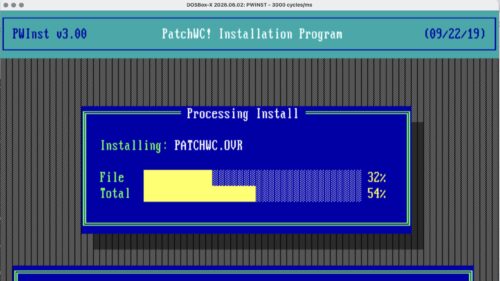
The v3.00 utility is a huge improvement over the v2.00 tool. The previous version pretty much ran in your C:\WILDCAT directory, did a bunch of stuff, and returned. The newer version is clearly intended to support multiple types of patches someday, has menus, can tell if individual binaries are fixed, and keeps logs.

PatchWC! v3.00


PatchWC! threshold adjustments


Once the new threshold is applied, it looks something like this in the log file:

PatchWC! v3.00 log

Here’s what the previous v2.00 tool looked like:

PatchWC v2.00

Of particular note the PatchWC tools may be picky on what versions of Wildcat! they’re run against. I want to say based on some forum posts that maybe v2 only worked on Wildcat! v4.0/v4.1 and v3 only worked on v4.2, but I do not know. Strings I dumped out of v3.00 lead to me to believe it might be aware of a wider set of version numbers.

Once this is done the binaries are ready for the post-Y2K world, but in my case I need the Pascal Runtime 200 patch re-applied. (I’m not sure if PatchWC! reverts the runtime patch or if my backup copy of binaries didn’t have the Pascal patch already applied).

Borland Pascal Runtime Error 200 patch

There are at least two tools to patch Borland Pascal .EXE files to fix the runtime 200 problem, one is PATCHCRT.EXE from Kennedy Software. This has been reliable for me, but has the annoying problem of only operating on a single file at a time. In the case of Wildcat! there are a couple dozen .EXE files that need to have PATCHCRT run on them, so the only option is to just hunker down and do them one at a time until you’re finished. Further aggravating matters is that some .EXE files may be PKzip compressed and need UNP.EXE to restore them before PATCHCRT can work. Other info about this problem is on the PC Micro website via the wayback machine.

Normally trying to run an unpatched .EXE file on a fast, modern (allegedly beyond 200 MHz) system results in the program exiting with something like Runtime error 200 at XXXX:XXXX.

I’d recommend copying C:\WILDCAT\*.EXE to somewhere as a backup.

Here’s running PATCHCRT.EXE WILDCAT.EXE:

PATCH-CRT

This is what it looks like after a Wildcat! binary has been patched:

Patch-CRT on WILDCAT.EXE

Now that both the Y2k and runtime error patches have been applied, all the binaries can be copied to your C:\WILDCAT directory, restart everything and you’re good to go.

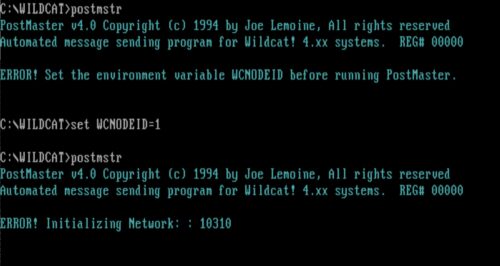
PatchWC! v3.00 and BTInitIsam error

BTInitIsam message

Why doesn’t PatchWC! v3 work on DOSBOX-X, is it possible to make it work?

It seems reasonable to fire up a DOSBOX-X session to do this patching work. For whatever reason when I try to run PatchWC in DOSBOX or even when booting Windows 95 to a command-prompt only session I get the cryptic error “10310: Unable to initialize filer. (BTInitIsam)“. This does not happen when I run the program while the Windows 95 graphical shell is running and I do it from a command prompt. The number seems to change in “Please correct X restart” but I have’t been paying attention to when it’s a 1 or a 2.

Starting SHARE.EXE support in DOSBOX-X doesn’t help. I haven’t found any suitable answers on Discord nor Facebook for why this happens and I know other people encounter it too. It’s possible this affects other Turbo Pascal programs too. For the sake of learning more how to debug MS-DOS executables I started poking at this more to see why this is happening.

In fact, here’s all the places I’ve tried it out of curiosity to see what is going on:

  • MS-DOS 6.22: PatchWC runs successfully!
  • MS-DOS 6.22 with SHARE.EXE: PatchWC loads successfully!
  • Windows 95, 32-bit GUI loaded, MS-DOS shell: PatchWC loads successfully!
  • Windows 95 DOS (no 32-bit shell loaded): 10310 error
  • Windows 95 DOS (no 32-bit shell loaded) with Netware 4.0 client running: 10310 error
  • DOSBOX-X with SHARE support: 10310 error
  • DOSBOX-X with SHARE, NE2000, and IPX support: 10310 error
  • DOSBOS-X with Windows for Workgroups 3.11, Microsoft Network, IFSHLP.SYS and NET START: 10310 error
  • DOSBOX-X booted into FreeDOS 1.4: 10310 error

PATCHWC.EXE itself is a PKzip-compressed binary, so it takes UNP.EXE to extract the real .EXE file to start poking around. Running strings on this didn’t turn up anything interesting, but strings on the PATCHWC.OVR file. This uncovers some interesting text:

)Unable to initialize filer.  (BTInitIsam)
: 2Unable to create buffer.  (BTSetVariableRecBuffer)U
@RP1
.DAT
Unable to create database!
Unable to open database!U
BTCloseFileBlockU
^L DATABASE :
.  #:
BTREE ERROR ->
Unable to lock database!

Which leads me to believe “BTInitIsam” refers to B-Tree and ISAM.. Last year I spent a bunch of time trying to find this and it lead me to TurboPower B-Tree Filer, but I didn’t bookmark it and Google is utterly useless now. Google will endlessly insist “did you mean British?”

A few hours later

Ok no thanks to Google I found some Pascal notes where I was working on this problem last year.

In the Turbo Pascal B-TreeFiler v5.5 User’s Manual we have the function BTInitIsam:

BTInitIsam function

This is talking about emulating a network. Inside the B-TreeFiler v5.5 source code and docs we have these matches for “10310”:

basic147: tpbtreefiler_5_55 bwann$ fgrep 10310 -R *
doc/errors.txt:10310   4     Network initialization error (BTInitIsam)
doc/errata.txt:Q: What does IsamError 10310 really mean?
doc/Help/filer.hxt:10310  (4)    0202BTInitIsam
source/FILER.INC:      IsamError := 10310;
source/ISAMTOOL.PAS:          10310 : IsamErrorMessage := 'Netz-Initialisierungs-Fehler';
source/ISAMTOOL.PAS:          10310 : IsamErrorMessage := 'Network initialization error';

and this

Q: What does IsamError 10310 really mean?
A: BTInitIsam was unable to find the network you specified as the
   first parameter. For Novell this means that proper shell wasn't
   found (either NETX or the VLM Requester) or that a server that has
   been logged in to was not found.

Why Google can’t find that anymore is a sorry state of affairs.

More notes: BTInitIsam calls IsamInitNet in ISNETSUP.INC, which then has a case statement for NoNet, Novell, MsNet. Inside NovellInitNet we have a VLM suppport check and a thing called IsamInstallInt24Handler. MsNetInitNet funnily just seems to do no checking and always returns MSNetInstalled if it’s configured in the FILER.CFG file.

function IsamInitNet(ExpectedNet : NetSupportType) : Boolean;
begin
  case ExpectedNet Of
    NoNet  : IsamInitNet := NoNetInitNet;
    {$IFDEF Novell}
    Novell : IsamInitNet := NovellInitNet;
    {$ENDIF}
    {$IFDEF MsNet}
    MsNet  : IsamInitNet := MsNetInitNet;
    {$ENDIF}
  else
    IsamInitNet := False;
  end; {Case}
end;

From the DOSBOX-X debugger it looks like it’s making a ton of INT 21h calls around this time, so it seems to be getting something here triggering the network detection.

…no luck so far. I wish I knew enough about IDA Free or the DOSBOX-X debugger to poke at this more.

International 484 project

1979 IH 484

I’ve been working my way through fixing up vintage computers and software, so why not get a vintage tractor running?

TL;DR: good news: tractor runs, bad news, a lot of bad things

[photos: flickr – IH 484 tractor]

We inherited this 1979 International 484 from dad and it’s sat here a few years now. I slowly realized it’s no longer “that old tractor out in the field” but “my tractor” now, so I need to take care of it. Besides, the front end loader bucket would be super useful in cleaning the place up. I did not know what kind of condition it was in, if it actually “ran when parked” or not. I recalled there being some sort of problem with either the clutch or brakes. Dad had taken it to somebody to repair and they had either gave up trying to fix it or they sat on it for so long he gave up on them and went and brought it home.

I learned how to drive on this thing long before learning to driving a vehicle, I spent many summers raking hay and many cold winters putting out hay with it for the cattle. I wasn’t old enough to run the brush hog nor cut hay with it. I knew my way around but not in any serious maintenance capacity.

First thing first was seeing what kind of shape the battery was in and if the engine would even turn over. One trip I left a charger on it overnight, it was still dead and the best I could do was get some clicks and buzzes out of the starter. In the summer working on the electrical was a dangerous activity because of how many damned red wasps had nested inside it. At the very least I wanted to get the loader bucket off the ground as it was continually full of water and starting to rust, so I got a floor jack and got the bucket up on a concrete block to keep it drained.

The next trip I came back heavily prepared, I had found on eBay copies of the IH Blue Ribbon service manuals (I didn’t even know those existed prior), parts catalogs, and the operator’s manual. Normally I don’t like giving money to people who probably just printed a .PDF file, but I couldn’t find them otherwise and at the end of the day I still needed the manuals. At least they were nicely printed and bound bootleg copies. Ironically I’d like to have both .PDF and hard copy so I’m not hauling manuals back and forth to Oklahoma.

Theres a surprisingly scant amount of videos about this model on YouTube (other than for-sale videos) for how popular it was, yet old, I don’t know if I’m surprised or not. I at least found one video where somebody was trying to turn theirs by hand to check the starter and if the engine was seized up which gave me ideas what to expect checking mine.

Battery and a diesel mess

Next trip I went by Wal-mart and bought a new battery to stick in it. After putting it in I decided to try to check the filters for water. What I didn’t yet realize that whoever changed the filters last had tightened down on the drain screw to secure the new filter. When I thought I was loosening the bowl drain of the left filter, the entire filter assembly dropped off the head and diesel started pouring out of the line!

Left filter under injector pump

I couldn’t figure out how to get the damn filter re-attached, the bolt wasn’t screwing into anything. It took a good ten minutes if not longer for me to finally see that on top of the filter head was a loose nut that connects to the bolt that goes through the whole filter assembly. The front end loader frame obstructs the side of the tractor around the filters along with the fuel injector pump and I did not see this. It also made it quite difficult to get my hand in there to hold the nut in place while screwing the filter assembly back on. Meanwhile gallons of diesel had spilled out, which most certainly got rid of the water that I initially saw and then some.

This was all before I had fully digested the parts diagrams and manuals and probably could have avoided the mess. Looking at least one YouTube video, somebody else stumbled into this trap before I did.

To my surprise, and with a shot of ether starter fluid, the thing cranked over and actually started! It ran for several minutes just fine, no problems. The tires held air amazingly. The front end hydraulics, three-point hitch hydraulics all worked smoothly, forward and reverse gears worked, brakes worked, and I drove it around in small circles to try it out.

First startup

First start after 4+ years

Test drive

First thing I figured out was there was indeed a problem with the transmission. I could not shift into high-range, with the clutch pedal depressed I was getting a quick grinding feeling that shouldn’t have been there. At least low-range gears 2-3 and reverse worked which is enough for moving around the place.

Previously talking to my BIL, he remembered the PTO wasn’t working, so I gave the brush hog a try. I’ve never used one before so what could go wrong. I figured out the second problem with the tractor, the PTO could be engaged, but it was very difficult to shut it off. It was like the lever couldn’t go back far enough to disengage, it had to be worked around and held back to finally disengage the PTO.

I made a couple of laps around the field with the brush hog. As I was coming back around the engine suddenly started choking and running rough, like I was running out of diesel yet I recalled there being around half a tank.

I parked and could not keep the the thing running for more than a couple of minutes every time. It was hard to start and was running very unevenly, like it was being choked of air or fuel. I actually wondered at one point if I had sucked a wasp nest into the air intake. I had the filter out while running, I was messing with the PTO when out of the corner of my eye I saw something swirling around inside the air canister that looked like a dirt dauber or wasp nest, and by the time I got things stopped it had disappeared. I don’t know if it fell out or got sucked in.

Rough idle – clogged diesel line?

IH 484 rough idle

Fuel dump

During the Christmas trip I decided to dump all the diesel and change the filters. This time I learned the fuel tank has a shutoff valve at the bottom and the manual actually says to shut that valve before changing the filter. Crankcase oil was a bit milky so it needed to be changed, and the radiator core was dry and needed about a half jug of coolant to top it off. I hooked up the air compressor and blew off a bunch of leaves and dust out of everything. I took a bunch of photos and measurements of things so I’d have reference later, particularly the electrical wiring behind the instrument panel.

I tried running my endoscope down the air intake to look for my wasp nest but had an annoying time seeing anything on my phone screen in the sun and getting the camera very deep. Judging by the diameter of the actual hole going into the intake manifold, it seems doubtful a wasp nest got in but who knows.

I tried to fix things up with the filters. I discovered I do indeed have the proper hollow bolt that goes through the filter for draining the water catch, I had feared the shady shade tree mechanic substituted their own part. I worked off the drain nuts that had been tightly screwed on, and cleaned out the inside so draining the bulb would work again like it should. For the life of me I couldn’t get the LH filter mounted again with the top o-ring installed, later looking at photos I saw the old o-ring at the top was still in the filter head. The LH filter had some rust stain which tells me it was sitting in water. A mirror would certainly be helpful for helping replace the O-rings and get the filter on.

The RH fuel filter was much easier to change as the front end loader frame didn’t get in the way nearly as much. Oddly I believe there was some slight differences between the RH and LH fuel bowls and packing rings, which again not sure if by design or shady mechanic. While I had it off I discovered that’s where the chassis(?) serial number plate was. I was beginning to believe it didn’t exist, it’s sure not where websites say it should be. Previously I was only aware of the serial number on the left side next to the clutch, which I believe is the engine serial number.

Interestingly while I had both filters out I had very little diesel running out compared to my first filter misadventure. This lead me to believe I had a blockage upstream somewhere which would explain why the engine was running so rough.

Lots of trash in drained diesel

I unhooked the fuel line from the bottom of the fuel tank and diesel was just dripping out into my funnel, not a strong flow like I was expecting. I whacked the valve with a wrench and just like that what looked like coffee grinds started gushing out! I wanted to take the valve out to completely drain the tank but it seemed like it was in there pretty good so I left it be. I used compressed air to blow into the valve and tank a bit and blew the fuel line out while the filter was off, so pretty sure I got rid of all the rust and crap. If I had a longer transfer pump I’d try sucking out some of the nasty stuff at the bottom of the tank.

Unfortunately while trying to put everything back together, the nut on the end of the fuel line snapped in half.

Sigh.

Broken fuel line nut

The fuel line seems a lot longer than it needs to be so I think I can cut off the end, install a new nut, and re-flare the line. I didn’t have a flare tool so I didn’t do it this trip. I am moderately confident after getting this back together, getting air out of the lines, that the engine will run better next time. Before I left I did completely fill the tank with diesel to avoid any water condensation causing problems before I get back.

Helpful resources

I’m still figuring this all out. Getting the official parts catalog has been a huge help, absolutely worth the money I paid for it. It has tons of diagrams to show how things fit together, it lets me know what the names of parts are actually called rather than “the slidey rod through the hole”. I’ve quickly learned the parts numbers mean everything when trying to find replacements or look up anything online.

Parts Catalog totally worth it

These YouTube channels had several IH 484 videos that I watched and gathered a lot from:

Some new additions to the modem teardown album:

US Robotics Courier 9600 HST connected

US Robotics Auto Dial 212A


  • US Robotics Courier 9600 HST (manual, photos), “widebody” FCC ID CJE794FAST. This is similar to the 14400 HST I already have in the album, except this one takes 16 VAC power with a male DIN-5 plug. A PDF of the manual already is online at vtda.org, I wound up scanning my copy too for good measure.
  • US Robotics Auto Dial 212A (manual, photos) – This one is pretty old, from 1982. It has the old USR logo and was the predecessor? to the USR Password modem recently featured by The Serial Port. Mine doesn’t power up and I’m still working on it, so I don’t yet have action shots. I acquired the manual for this one a while back and it’s on Internet ArchiveUpdate: I got it working, see below
  • Apple Modem 1200 (photos), this was around the Apple II era. It has some chips labeled with USR 82-83 copyrights. This has a DE-9 serial connector and I haven’t got around to trying it out.
  • Cardinal V.34 with Voicemail (manual) – This is like the chonkier version of the Cardinal 28.8k I used to run with the ISP. The manual for it is up on Internet Archive.
  • Practical Peripherals PM14400FXSA V.32 bis (photos) – The first Practical modem I’ve got my hands on. Other photos I’ve seen on eBay indicate it uses a 16 VAC barrel plug, when I tried a 9 VAC and 15 VAC, the unit powers up but makes very unhappy speaker noises when I try to call out.

USRSTATS with a 9600 HST connection

Most of these are VCF West finds, I’ve slowed down a bit because I have modems running out of my ears, but will still try to pick up 1994-ish modems to document.

Yes I’m still aware a Flickr album is a lousy way to curate this growing collection. I haven’t got around to vibe coding myself a database gallery yet.

Update: Nov 15: The USR Auto Dial 212 lives!

I think I finally concluded the $4 flea market 9 VAC transformer I have either has a short in the connector or the plug isn’t long enough to properly mate with jack on the modem. It takes a lot of careful fiddling to get it just right where it stays on. Originally I was afraid some component on the board was failing. I’ve ordered some new jacks to try making adapters sometime soon.

Anyways the modem seems to work just fine! The AT commands must be all uppercase to work, and other than S-registers there’s really not many commands. It’s basically, dial, hang up, answer, speaker on/off, and show response codes, that’s it. I made several calls to the BBS over my VoIP connections, about half were good, half were mangled from line noise. There’s some overrun issues with heavy ANSI screens but that feels more like a flow control issue on the BBS side than anything.

Action shot of the Auto Dial 212A dialed up to the BBS at 1200 bps

Testing the Auto Dial 212A

USRSTATS from the BBS

Annie Corene (Farrell) Cox – family history video (YT)

Last year I found an audio cassette that turned out to be my great-grandma Corene Cox (“Granny Cox”) providing a family history from 1987. It covered the Farrell, Raper, and Cox families, growing up in Mississippi and Oklahoma. I had the tape digitized last year. I didn’t want to just throw the audio up online somewhere (it was 24 minutes), I wanted the material to be discoverable so I set off trying to transcribe everything. The tape was noisy and scratchy, AI-based transcriptions fell flat on their face and I realized I would have to do it by hand.

I spent hours listening to the audio on headphones, rewinding over spots over and over to make sure I understood it as I was typing. I had to build out entire swaths of family on the family tree to make sure I heard the names and dates right. Eventually I got the idea to adapt the audio into a video version but instead of some boring waveform visualization, I’d splice in real family photos to go along with the names. After all, I had scanned hundreds of family photos and I could cover most people with something.

This turned into a whole project I worked on and off of for a year. It took a while to find good photos, especially of couples. I did not want to ruin the risk of copyright or photos of questionable origin so I only used photos that I personally scanned.  On top of photos I spliced in screenshots of sections of family trees from Ancestry. I tried to keep it simple, I did not want some gaudy contraption with music jammed in and screams “graphics design is my passion!” to overload the simple narration. Finally I got a rough cut together then spent some time redoing half of it so everything looked consistent.

I posted the raw audio and transcript earlier this year up on my Documents/Genealogy page just to get it out there. Yesterday I finally finished the video (done is better than perfect) and uploaded to YouTube.

Some highlights:

  • Growing up in Guntown, Mississippi
  • Living in Calvin, Lindsay, Fish Creek, Kinta, Oklahoma
  • Henderson Raper and Arminda Kent having four and two children, respectively, from a previous marriage, then having TEN MORE children together (I mean it was a post-war plantation after all).
  • Picking 200 pounds of cotton to pay for her wedding dress, hat, and shoes
  • Getting married to Will Cox (W.R. Cox) in 1916
  • Will Cox delivering the mail in Kinta with carriage driven by a blind horse
  • Losing their son Billy Joe Cox in WWII
  • A sister getting a splinter under her fingernail from floor boards (no carpet) and losing the first digit of her finger
  • 50 years of church attendance
  • Visiting every US capitol, Canada, and Mexico

As I’ve noted a few times, some of her history sounds familiar to an article that came out a couple years later in a book two years later called “History of Haskell County Oklahoma – Indian Territory 1988”. The article cites it all came from an audiotape provided by Corene Cox, but there’s details in the book that aren’t in this version. So, I dunno if there was another version produced or they just supplemented it with additional interviews.

There’s somebody in the audio there helping Corene read material but I don’t recognize who it is. I’m pretty sure it’s not Inez, although she can be heard laughing in the room at the very end of the tape. It could be somebody from the Haskell County Historical Society doing the interview or could be one of her sisters, I have no idea.

Finally cut the cord

I haven’t posted in a while, but the big news I finally cancelled my cable TV service after 20 something years! Thanks to Comcast’s infinite money grabbing ways, they would happily let me stay on a data plan with usage caps forever until I “upgraded” to a new unlimited plan, which finally prompted me to deal with them. For months now I rarely watch actual TV, it’s all been YouTube and Plex videos. I used to keep the news on as background noise but that has long been dominated by politics and yelling, I’ve had enough of it. Between briefly catching up on CNN in the morning and watching the rather good “x That Build America” series in the evenings it’s just not worth the $140/mo I was getting gouged for.

Of course in our AI hellhole world cancelling cable was difficult. “Just use the website” they say. The website only offers ways to add/upgrade cable/internet/mobile plans, no way to subtract. The “Comcast assistant” is utterly useless, it’s not even a chat bot, it’s a bunch of pre-selected prompts to click through. The “live assistant” isn’t any better, when I tried to use it it errored out but at least dropped a phone number to use. Unfortunately it took 6 tries before the number actually worked. It would answer and then immediately disconnect. Fortunately when I did finally get through to a human it was fairly quick work to tell them what I wanted and there was no haggling.

It does feel rather weird turning on the TV out of habit and not having a channel lineup anymore. But at least I’m saving a lot of money and no longer have a data cap! We’ll see how long it lasts before I give in and relapse to TV society.

Update 11/2025: I figured out my LG TV has a bunch of “IP TV” channels. God knows how I’m being sold out to get those for free (I had to tweak my DNS sinkholes a bit to allow them) but now I have some of my local channels, CNN Headline, and CNN en Español, perfect! The CNN Headline channel reminds me of how it used to be way back when, just news for the day in 30 minute chunks over and over. No endless politics or obnoxious holier than thou anchors, just here’s what’s going on in the world right now.

I just finished up being a juror on a weeks long felony criminal case. A good hunk of the case depended on some video evidence from commercial outdoor security cameras in the middle of the day. I was in utter disbelief at how potato quality the video was, how it was mishandled, and the prosecutor wants us to reach beyond a reasonable doubt on some blocky squares that might be somebody’s arm? or leg?

After dealing with people breaking into my dad’s hardware store over the years and using those experiences to constantly refine how I capture video footage to better identify individuals to the sheriff, I have ✨Lots of Opinions✨ about security surveillance video. Video quality has gotten amazing over the last 10 years, going from shitty analog cameras to shitty 640 x 480 motion JPEG cameras, to 1.3 megapixel CCD/CMOS sensor cameras with audio, and now we’re up up to 8 megapixel 4K cameras that capture blades of grass and audio 20 feet away for $99. I am constantly swapping out cameras over time as things get better and what used to be blurry blobs at night are turning into real features. Beyond higher resolutions I’ve always advocated for better framing, lower camera positioning, just like you would taking a photograph. It always makes me sad when I see footage from high up of the top of somebody’s head and can’t tell anything other than their clothing.

To be fair in this case most of the crime was obscured on the other side of a vehicle so even a 4K video wouldn’t have helped much.

First off, the owner of the video system provided to the cops a screen recording of their security DVR system while it was up displaying 11 cameras angles at once, that was it. They testified while the cameras recorded independently they could not provide any source video files because “our system won’t do it, they’re so huge, it will break”. I have no idea what the cameras were but I imagine on a commercial system it was probably a few megapixels each. Because it was a recording of a recording, all those pixels and detail, just utterly thrown away and gone. And because it was an overview screen, all video windows were 1/11th the size of the total screen. What might have been 2560 pixels wide originally might now be 480 pixels wide on screen.

Now imagine this being played for a jury on a 53″ TV on a wall 20 feet away, we can’t see shit for details or people. During jury deliberation we got to view the video all we wanted on a old Thinkpad on the jury room, but still pretty bad. I’m not so sure if this was an improvement over just a cell phone recording of a monitor. Also interesting, the jury room laptop has to be old enough to play CD-ROMs.

Based on differing testimony between the video owner and the detective who collected the video, and general prickliness about the situation, I got the distinct impression the owner did not want to help the police at all due to their personal feelings/politics. Even with a violent crime happening on their property, they just wanted to do the bare minimum. They couldn’t be bothered to even get a screen recording of the individual camera views. The video file provided was panned/zoomed in a lot on the 11 camera view to follow single camera views as the action unfolded and moved around, and sped up/slowed down quite a bit presumably to get past times when not much was happening. It’s not clear who did the editing. The owner claimed the detective directed them (or their staff) how to do the screen recording, the detective claimed the owner just gave him a chair and a computer and left him figure it out on his own.

There was also the issue of video retention. The system owner said their system strictly captured 10 days and deleted everything, with no way to save files, which seems dubious to me. The detective admitted on the stand he had made a mistake at handling the video, he didn’t get around to reviewing the footage he was given until several days later due to workload. By then he realized there were no single-camera views on his USB drive, just this aggregate view, and by then all the original footage was all gone.

I get that the owner might not be a computer person, they’re at the whim of a black box they bought, maybe going by what somebody else told them about the system, and this whole ordeal is taking time out of their day, but still what kind of shitty system was this that it fails at its only job unless it was just to check off a box for insurance or corporate policy.

The original speeding up/slowing down of the video was problematic too. If it was sped up the person looks like they could be running away to flee, whereas normal speed they look like they’re calmly walking. The prosecutor had a video expert try to re-create the original timeline by making the frame rate uniform, and upscale the video to make it larger which helped but it made for jerky, blocky video.

I later told this story to a cop friend who did detective work and he just shook his head. He told me that in a situation like this where the owner couldn’t/wouldn’t provide original footage, especially if the victim was hurt, he “would get a search warrant in a heartbeat, take the system, the hard drives, everything, and get their own people to get that evidence”.

So I guess the lesson of the story is, if you want to use your video footage to prosecute theft, crimes, or whatever on your property make it easier on everyone by providing the best, largest, footage you can as quick as you can, and hang onto the original files. Imagine twelve people trying to look at it from across the room. Not so much tiny windows on a screen. Also maybe not store your video footage on your only NAS in case it gets taken. Much like how I say what you say can wind up in double-spaced transcript in court, be mindful of how your footage plays out for a jury, literally.

166 MHz LED readout

Back in the day when we had x86 IBM PC systems with “turbo mode”, which was really a reverse euphemism for being able to slow down the CPU clock for older applications, snazzier cases had a LED readout on the front to show the current MHz instead of/in addition to just a plain turbo LED.

These weren’t automatic at all, they were just dumb little circuits that displayed one set of numbers if the turbo lead was on and another set if the turbo lead was off. The boring people made their readouts say “HI” or “LO” so they didn’t have to bother knowing actual MHz or didn’t have enough digits. Inside the case was a group of jumpers that had to be set to turn on/off individual segments. This varies from case to case and the information for setting them up is almost lost to time, as the setup instructions are usually on a piece of paper with the case that promptly gets thrown away. Otherwise you’re left to just randomly pulling and setting jumpers to get the readout you want.

Backside of MHz readout board AT-302A

So for future google/AI searches here’s my setup instructions for my particular full tower AT case with casters, I have no better way to identify it by model/manufacturer really than that. The readout PCB is labeled “AT-302A”.

Vintage 386/486 beige full tower AT case, 5x 5.25″ drive bay, 2x 3.5″ drive bay.

This thing just screams back room closet server. You know it’s serious business because it has wheels!

Case MHz readout setup instructions

MHz LED readout power connector

Mine are printed on the box that holds all the accessories such as the wheels, screws, and drive blanks so it’s not as easily toss-able.

The PCB that contains all the LEDs gets power from a Molex drive connector, has connectors for the hard drive activity LED, and then a single negative lead that runs off to the “turbo LED” pin of the motherboard. If the pin is asserted on/off is what tells the readout board which MHz to display.  In my case my motherboard has no turbo mode so I want to connect it in such a way the turbo mode LED is always “on” and speed displays “166” for my Pentium 166 MHz CPU. I have the non-turbo speed set to “50” since that’s technically the bus speed, but this is never seen except for a very brief second when the PC is turned off.

Planning the readout

As recommended I did a quick sketch of what I wanted the LED readout to show, which segments needed to be lit when in turbo mode, not in turbo mode, and which segments stay unchanged between turbo mode on/off.

Here D1, D2, D3 are the individual 7-segment LED digits, and A-G are the seven segments within each LED digit. For example on the rightmost digit, D3, I wanted this to be either a 6 or a 0. When turbo was “on” segments A, C, D, E, F, G were on, and for turbo “off” use segments A, B, C, D, E, F. The common segments between both modes were A, C, D, E, F.

On the back side of the readout where all the jumpers were, this meant A, C, D, E, F need to be set vertically across the “P” pins. B needed to be set horizontally across the “L” jumper to get “0”. and G set horizontally across the “H” jumper to get a “6”.

Repeat for all three digits.

Originally I had the “1” on the left side of the segment display and was told this was aesthetically wrong and it looked like Sid from Ice Age. I agree, so I tweaked it.

Goofy 166 version

Further case identification from the shipping box, item no TP-918D, 75.x x 31 x 55 cm:

AT tower case TP-918D

Diamond collection

At the recent Electronics Flea Market somebody had a stack of Diamond ISA and VESA Local Bus video cards for sale. Which is funny because I had just been looking to maybe take the splurge and try to find a VLB card with an Tseng ET4000/W32 to put into my 486. I currently have a Diamond Viper VLB with 2 MB VRAM which was spendy back in its day, but had a basic Oak chip for regular VGA work so it’s aggressively average.

They weren’t what I was hunting for but interesting so I bought them all to at least archive manuals and disks. There was a Diamond SpeedStar 64 2000 ISA, Diamond Stealth 64 VLB 2120, a Diamond Viper Pro Video, and a Viper VLB. Unfortunately the latter was just an empty box of disks and manuals I found out later, but was still nice because it was everything for my exact Viper VLB card. These all apparently came from the old Halted / HSC Electronic Supply store in San Jose. All but one white box looked like regular Diamond retail boxes, but all the manuals inside were stapled photocopies with HSC markings and disks were generically labeled. I don’t know if this was some sort of HSC white box special or what.

The driver disks weren’t in great condition when I tried to make copies so I’m not sure if I’m going to post them to Internet Archive. I was able to at least add some original photos of the cards to The Retro Web, my first contributions!  (Diamond SpeedStar 64, Diamond Viper Pro Video, Diamond Stealth 64 DRAM) Maybe someday I’ll get fancy enough to upload the contents of the ROMs.

The Viper Pro Video and Stealth 64 had some empty sockets for upgrading the video RAM so I wanted to max them out for giggles. I’ve never bought VRAM and the Diamond manuals did not cover at all what kind of memory was needed to upgrade the cards. After some searching through Vogons it seems the magic term was “256k 40-pin SOJ”. It’s not clear to me what the difference between “video RAM” and “DRAM” is, it would appear VRAM has some extra instruction lines but all the ebay listings seemed to just lump them together.

Diamond Viper Pro Video VLB


Diamond Viper Pro VLB

First was the Viper Pro Video. This had a Weitek 9100 chip on it which was an improvement over the other Viper card in my 486. It had 2 MB onboard with sockets to allow up to 4 MB, which should considerably bump up the color count and resolution it could handle.

I first ordered up some 256k x 16 EDO DRAM, V53C16258HK-40, but the card BIOS didn’t recognize the extra RAM at all on boot. DOS worked but Windows 95 got all glitchy with it installed.

After that I tried some 256k x 4 FP DRAM, KVM428C256J-7, that I had saw on a photo of the PCI version of the card. Luckily I happened to find a memory place in Santa Clara that had these old chips in stock.

All the megabytes!

This worked, 4 MB VRAM Installed! Looking at old memory prices these SOJ chips seemed to run around $30 each in 1995 so this would’ve been a $240 upgrade on top of a $649 card. In 2025 dollars thats $517 and $1400, respectively.

Diamond Viper Pro VLB with 4 MB VRAM installed

In Windows 95 this got me up to 1152 x 684 with 32-bit True Color, which was a pretty nice improvement.

1152 x 684, 32-bit color with 4 MB VRAM


Diamond Stealth 64 DRAM VLB

Next was the Diamond Stealth 64 DRAM VLB. This only had 1 MB of DRAM installed and only two sockets for an extra 1 MB of DRAM.

Diamond Stealth 64 DRAM VLB

Here I just matched the part number that was already on the existing RAM, Samsung KM416C256BJ-6.

Diamond Stealth64 with 2 MB DRAM

I didn’t do any testing in Windows with this one, I just verified it worked.

I finally reached the point in my vintage gear lifestyle where I needed to replace old Dallas realtime clock chips that have dead batteries. I opted to try to find replacement chips, taking a gamble with “new old stock” units, instead of trying to grind down the side of the chip casing to attach leads (and spray plastic everywhere). From what the datasheets tell me, the Dallas RTCs have some sort of internal shunt that leaves the battery disconnected until the first time VCC is fed voltage, a neat trick. So hypothetically if it’s a NOS unit that’s never been installed, there’s a good chance the battery is good.

I’m aware of the RetroTronics and Necroware replacements, I couldn’t find what I needed at the moment but I ordered some for future projects. In particular for my motherboard repair I was concerned about the height of some of the modern coin-cell replacements that might impede longer ISA cards. There’s no telling how long my NOS replacements will last, so I may be coming back and replacing them all with modern RTC replacements and brand new batteries.

Asus P/I-P55TP4N socket 7 motherboard

Asus P/I-P55TP4N motherboard – CMOS checksum error

First was my Pentium 166 motherboard for my Novell NetWare server. This had a Dallas DS12B887 that was dead and threw CMOS mismatch errors on boot. For this I found a set of Dallas DS12887+ chips on Amazon, no idea how counterfeit they are (2412D date code?) but at least one seemed to do the trick. Pin 21 was absent on the DS12887+ replacement, this appears to be used for manually clearing the CMOS. I haven’t needed this yet, but I have put a socket on the motherboard so I think if I need to clear CMOS I can just pull the chip (unless it’s using on-chip memory).

Original DS12B887 and replacement DS12887+

Once I got the DS12B887 off the board I noticed under the chip was writing that indicates either a Dallas DS12887A or a Benchmarq bq3287A could be used in its place.

Space for Dallas DS12887A or Benchmarq bq3287A

Along with a 24-pin DIP socket, the new chip went right in and didn’t have any problems booting the system. It sticks up slightly higher than the ISA slot, but not by much.

Socketed replacement Dallas DS12887+

Adtran Atlas 550

Next up was my Adtran Atlas 550. Here the system would just lose its config when the unit was powered off, such a number/trunk/port settings, and IP addresses. A bummer after tediously setting them up. Fortunately the system supports downloading and uploading the system config to a TFTP  server, so I was able to save my working configuration before replacing the RTC chip. Main menu -> System Utility -> Config Transfer -> Transfer Method TFTP, IP address, filename -> Save Config Remotely. Similarly on this screen is Load and Use Config to download a config from a TFTP server.

Adtran Atlas 550 with old and new DS14287 RTC

The system uses a Dallas DS14287, which is slightly different than most Dallas RTC replacements out there. I found these DS14287 replacements on eBay and gave them a try.

The Atlas was a little bit of work because the motherboard needs to be taken out of the chassis and there are various clips and plastic light guides in the way. The power supply is also built on the same PCB. Between the RTC and the metal carrier that cards slide into, there’s about a 1/4″ – 3/8″ clearance:

Clearance between top of RTC chip and chassis

Of note when trying to take the motherboard out, over to the side of the power input part of the board, there’s a metal rail along the edge of the chassis that have these heatsink clips that clip over several voltage regulators. These just slip off.

Heatsink clips

Also remember to remove the DC terminal block if they’re plugged in:

Terminal block holding motherboard in

After this there’s just a set of screws holding the motherboard to the case. Also be aware of the large capacitors when taking the board out, to make sure not to accidentally grab one or short it on the chassis.

This one was mostly easy to get the old Dallas chip out, I recall just one or two pins being stubborn because they were on a ground plane.

Removed old Dallas DS14287

Next was putting in a 24-pin socket:

And then finally putting in the new Dallas DS14287 chip:

Socketed Dallas DS14287 replacement

After putting everything back together, the unit just powered right up without any issue. It retained my config after a few power-offs and seems to work well.

Older Posts »